


CustomBank
4.519.00 Reviews
App Specs
- Version
- 2.12.1
- Updated On
- License
- Free
- Downloads
- 10,000+
- Developer
- CustomApps LLC
- Categories
- Finance
- Platform
- Android
Screenshots
 Analysis by AppCompare
Learning to manage money is difficult when every mistake feels expensive. CustomBank takes a safer route: it gives me a practice banking environment where I can explore a personal financial setup without using real funds. That makes it less like a normal banking app and more like a hands-on learning tool for understanding balances, spending decisions, and the habits behind everyday money management.
I found the idea most useful for people who want to rehearse financial routines before applying them to a real account. It can also help parents, teachers, or beginners explain banking concepts in a less intimidating way. At the same time, it is important to approach it with the right expectations. This is not a replacement for a bank, a budgeting service connected to live transactions, or a way to move actual money. Its value comes from practice and customization.
Building a practice banking routine
The first useful step is to treat the app as a small financial sandbox rather than something to check casually. I would begin by creating a simple picture of an imagined financial life: regular income, recurring expenses, flexible spending, and a savings goal. The point is not to make the setup perfectly realistic on the first attempt. The point is to create enough structure that each decision has a consequence inside the practice environment.
That approach makes the app easier to understand than simply tapping through screens and changing values at random. When I give each part of the financial world a purpose, I can ask practical questions: How much remains after fixed costs? What happens if a discretionary purchase is added? How long does a savings target take to reach? A simulated account becomes much more useful when it reflects a routine I might actually follow.
The absence of real money is one of its strongest advantages. A beginner can experiment without worrying about an overdraft, a failed payment, or an accidental transfer. That freedom also creates a responsibility: I have to remember that success in the app does not automatically prove that a real-world budget will work. The practice is valuable, but it remains a model.
CustomBank is a free finance app from CustomApps LLC, with an Everyone content rating. It arrived on July 3, 2025, and the current version is 2.12.1, while Android users need version 6.0 or later. Those details make it accessible to a broad range of devices and users, especially people who want to try a financial learning tool without committing to a subscription at the door.
A realistic everyday scenario would be preparing for a month with several competing priorities. I might set up a regular income, reserve money for rent and utilities, add a grocery allowance, and create a goal for an upcoming purchase. Then I could test what happens when food spending rises or an optional expense is moved earlier in the month. The useful lesson is not the final balance by itself; it is seeing which choices create pressure and which habits leave room to adjust.
Worth Reading Before You Choose

Flipboard Shows What News Apps Must Do Beyond the Feed

Switching to Android Auto Means Rethinking Your Driving Routine

Google Calendar Makes a Crowded Week Easier to Manage

Ludo King Makes the Most of the Minutes Between Plans

Baby Panda World Brings Quick Play to Modern Phones, but Its Game Library Feels Busy

ESPN’s Live Game View Makes Following Close Games Easier
I would also recommend using separate practice scenarios instead of constantly changing one setup. One version could represent a cautious month, another could allow more leisure spending, and a third could simulate an irregular income pattern. Keeping those ideas distinct makes comparisons clearer. It prevents a common mistake in finance apps: changing so many assumptions at once that the result no longer teaches anything.
Settings that deserve an early check
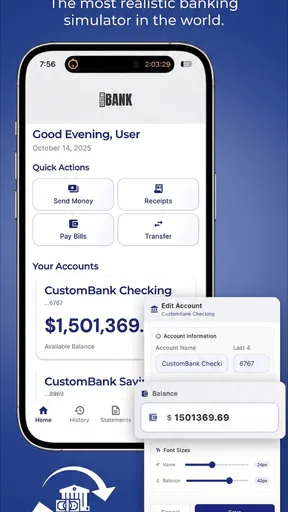
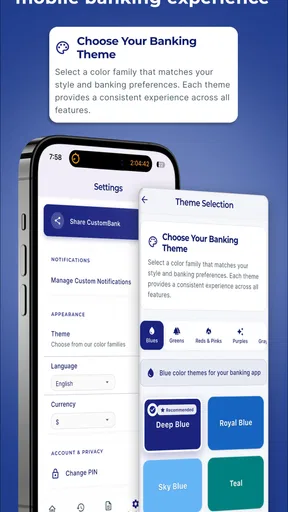
Because the app is built around a customizable financial world, I would spend time reviewing the available settings before trying to make a detailed plan. The most important question is what each customizable element represents in your own exercise. A balance can be a starting point, a recurring amount can stand for income, and an expense can represent a commitment or a choice. Clear labels matter more than decorative detail.
I find it helpful to use plain, consistent names. Instead of creating several vague entries called “spending,” I would separate essentials, transport, food, entertainment, and saving. This creates a mental shortcut every time I return to the setup. It also exposes weak assumptions. If everything is placed under one broad category, it becomes difficult to tell whether the problem is a large fixed cost or a series of small decisions.
Another useful habit is to change only one setting when testing an idea. If I want to understand the effect of a higher grocery budget, I should leave the rest of the practice world alone. This is a simple method, but it produces more reliable conclusions than rebuilding the entire setup after every experiment. It is especially useful for someone learning why a budget changes, rather than merely trying to make the balance look healthy.
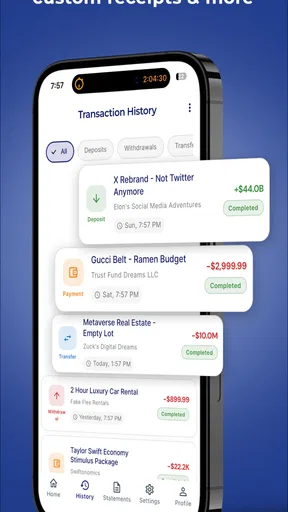
The customization can also be used to teach timing. A cost that appears at the beginning of a cycle feels different from one that arrives later, even if the total is identical. I would use that distinction to rehearse cash-flow awareness: not just how much money exists, but when it needs to be available. That is a more advanced lesson than adding income and subtracting expenses, and it is one reason a practice environment can be more engaging than a static worksheet.
There is a trade-off here. More customization can make the exercise more personal, but it can also make the setup slower and easier to overcomplicate. I would resist the urge to reproduce every small purchase immediately. Start with the few items that control the outcome, then add detail only when it answers a specific question. A simple model that I understand is more useful than a crowded one that I no longer review.
The app has an average rating of 4.5 from around 310 ratings, and it has passed 10K installs. That suggests a modest but established audience rather than the scale of a mainstream mobile bank. I would read that as encouragement to try it for its focused purpose, not as evidence that it offers the depth or connectivity of a full financial platform.
Faster patterns for repeat use
Once the initial world is created, the best way to save time is to establish a repeatable review sequence. I would check the starting balance first, then fixed commitments, then flexible spending, and finally the goal I am trying to protect. Following the same order makes changes easier to notice. It also reduces the temptation to focus only on the most visible number.
A second pattern is to use short practice sessions. Rather than redesigning the whole financial setup every day, I would make one deliberate adjustment and observe the result. For example, I might reduce an optional expense and then compare that outcome with moving the same amount toward a goal. This turns the app into a decision rehearsal tool instead of a passive display.
For people teaching children or teenagers, the app can support a useful conversation about trade-offs. A learner could choose between spending now and preserving money for a goal, then see how the imagined account changes. The discussion should stay focused on reasoning rather than punishment: what was the priority, what changed, and what would be done differently next time? The simulated setting makes those questions easier to ask.
I also think it works well for someone starting their first personal budget. Before linking anything to a live service, that person can practice naming expenses and deciding which costs are essential. The exercise may reveal that the hardest part is not arithmetic but consistency. If a user never returns to review the setup, even a well-designed financial plan becomes irrelevant. A recurring calendar reminder outside the app could help turn practice into a routine.
One non-obvious advantage is that customization lets users test emotional decisions without financial damage. Someone who tends to spend freely after receiving income can create a scenario that places optional spending beside a savings goal. Someone who is overly restrictive can test whether the plan leaves any realistic room for enjoyment. The app cannot measure motivation for me, but it can make the consequences of a chosen pattern easier to discuss.
There is also a practical comparison with ordinary calculators and spreadsheets. A calculator is faster for one-off arithmetic, while a spreadsheet offers more control for users who enjoy building formulas. CustomBank is more approachable for people who want to interact with a prepared banking-style environment rather than design their own system. The compromise is that a spreadsheet may be better for detailed reporting, custom formulas, or long-term analysis.
Compared with a real mobile banking app, the difference is fundamental. A bank app shows actual balances and transactions, which is essential for account management but risky as a place to experiment. CustomBank is better when the goal is learning through safe trial and error. Compared with a connected budgeting app, it is less suited to automatic tracking because its central appeal is the ability to construct a financial world manually.
Where experienced users should set limits
The most important limitation is also the clearest boundary: practice figures should not be mistaken for real financial records. I would never use the app as the sole source for deciding whether a real payment can be made. Before acting in real life, I would check the actual bank account, pending transactions, payment dates, and available funds separately. The simulation can prepare a decision, but it cannot authorize one.
Manual customization can become another source of friction. If I forget to update a scenario or enter an assumption incorrectly, the result may look more precise than it really is. That is why I would record the purpose of each scenario and avoid treating its balance as a prediction. The more detailed the model becomes, the more important it is to review whether the underlying assumptions still match reality.
Users should also think carefully about the app’s commercial model. It is free to use, with in-app purchases ranging from $1.99 to $99.99 per item. I would start with the free experience and decide whether any optional purchase genuinely improves the learning workflow. A practice banking tool should not pressure someone into spending more than the value they receive from the exercise.
Another limitation is audience fit. Someone who already has a mature budgeting system, wants automatic transaction imports, or needs investment and bill-management tools will probably be better served by a conventional financial service. CustomBank is not the right choice simply because it belongs to the finance category. Its specific strength is controlled simulation, and that strength may feel too narrow for an experienced user seeking live account management.
Privacy-minded users may appreciate the basic idea of avoiding real transactions, but they should still apply normal care when entering personal details into any app. I would keep the practice world fictional or generalized unless there is a clear reason to use personal figures. That makes the exercise safer and also keeps the focus on habits rather than on reproducing an exact financial profile.
For iPhone and iPad users, the practical decision is to check the appropriate platform listing before downloading, since the confirmed Android requirement does not describe every device environment. The important takeaway is that the app should be judged by how comfortably it fits your device and learning routine, not by expecting it to behave like a full bank on every platform.
My verdict after using it as a learning tool
I see CustomBank as a focused practice app with a clear purpose. It is most convincing when I use it to rehearse decisions, compare scenarios, and build a repeatable money-review habit. The customizable financial world gives beginners a gentler place to make mistakes, while more experienced users can use it to test assumptions before changing a real budget.
Its strongest workflow is simple: create a small scenario, give every entry a clear role, change one variable at a time, and return regularly to review the result. That method produces more value than trying to build an elaborate financial universe immediately. It also keeps the app honest about what it can do: help me think more clearly, rather than manage funds on my behalf.
I would recommend it to students, first-time budgeters, parents teaching basic money skills, and anyone who wants a low-risk way to explore spending choices. I would skip it if my main need is automatic tracking, live balances, transfers, bill payments, or advanced financial reporting. In those cases, a real banking app or a connected budgeting service is the better tool.
My final opinion is positive but measured. The app’s free entry point, Everyone rating, and accessible Android requirement make it easy to try, while its customization gives the practice more depth than a simple calculator. Still, the manual nature and simulated results demand discipline. Use it as a rehearsal space, not as a substitute for checking your real finances. With that boundary in mind, it can turn vague money worries into specific, repeatable decisions—and that is a worthwhile job for a small finance app.
Pros
- Simple interface makes everyday banking tasks easy to find.
- Quick access to balances
- transactions
- and account details.
- Mobile banking reduces the need to visit a physical branch.
- Useful alerts can help you monitor account activity.
- Convenient access to banking services while traveling or away from home.
Cons
- Some features may depend on your bank or account type.
- App performance can vary with internet connection quality.
- Advanced banking services may still require branch assistance.
- Security checks can occasionally make sign-in feel slower.
- Not all devices may support every available app feature.
FAQs for CustomBank
What is CustomBank and what can I use it for?
CustomBank is a personal finance and banking application designed to help users manage their money from a mobile device. Depending on the services available in your region, it may let you review balances, monitor transactions, organize accounts, and access other banking tools. Before downloading, check the official listing to confirm that CustomBank supports your country, bank, and the features you need.
Is CustomBank safe to use for managing financial information?
CustomBank handles sensitive financial data, so security should be one of your main considerations before installation. Review whether the app is published by the legitimate bank or service provider, and download it only from an official app store or verified source. Use a strong password, enable biometric protection if available, avoid public Wi-Fi for sensitive actions, and never share verification codes.
Does CustomBank work with my bank or financial institution?
Compatibility depends on the version of CustomBank and the financial institutions supported in your location. Some banking apps are created for one specific bank, while others connect to multiple providers through approved services. Check the developer name, supported institutions, country availability, and required account type on the official download page before installing or entering any banking credentials.
Are there fees for using CustomBank?
Downloading CustomBank may be free, but that does not necessarily mean every service inside the application is free. Your bank or provider could charge fees for transfers, card services, international transactions, account features, or optional products. Mobile data charges may also apply when using the app away from Wi-Fi. Always review the provider’s current fee schedule and terms.
What should I do if I cannot log in or notice an unfamiliar transaction?
If you have trouble signing in, first verify your internet connection and use the official password-recovery process rather than entering details into links received from unknown sources. For an unfamiliar transaction, contact the bank or financial provider immediately through the phone number or support channel shown on its official website. Do not uninstall the app before recording relevant details, and change your password if you suspect unauthorized access.


